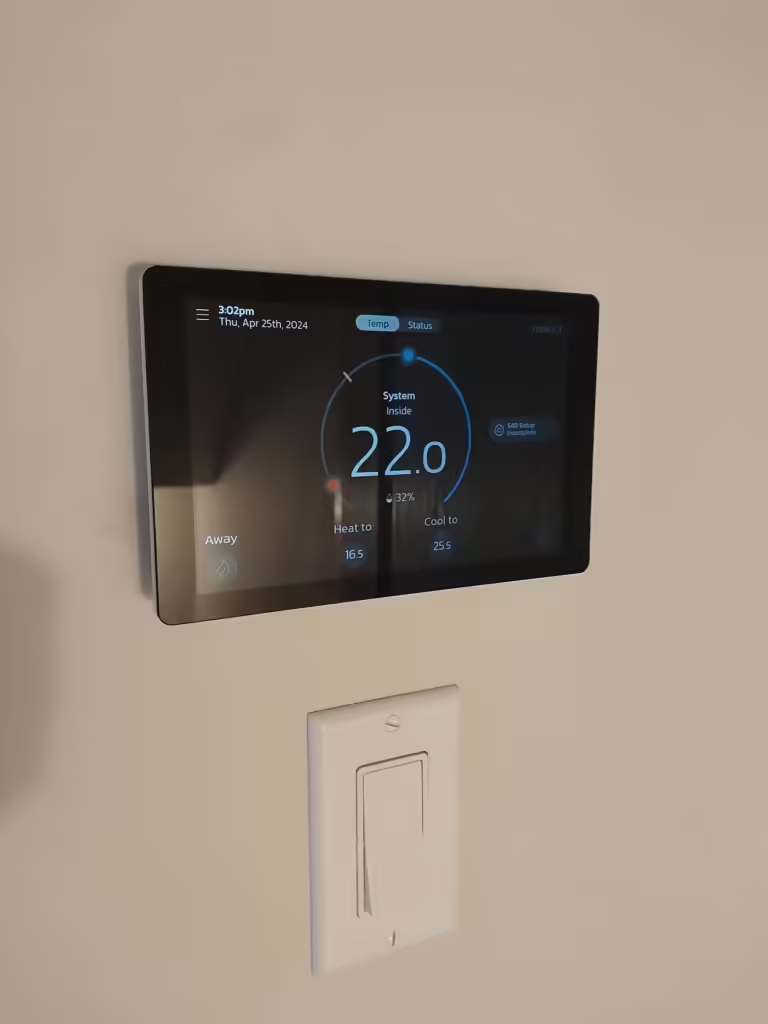
If you are one of our Ottawa customers with a Lennox S40 or L40 smart thermostat, your system just received a major upgrade—without you having to lift a finger.
Lennox has officially rolled out support for Matter, the new universal standard for smart home connectivity.
At AirZone, we believe a thermostat should be more than just a dial on the wall; it should be the brain of your home’s comfort. This update, combined with the real-world performance data we are seeing from Ottawa homes this November, proves that the S40 is in a league of its own.
The Highlights: What’s New for Winter 2025
- The Big Update: The S40 now supports Matter, allowing direct connection to Apple Home, Google Home, and Alexa without extra hubs.
- The Comfort Hack: The “Feels Like” setting calculates a “wind chill” for your living room. In dry Ottawa winters, it automatically adjusts heat to ensure 21°C actually feels warm.
- Local Savings: Real data from Ottawa homes shows Smart Away™ mode saving 200+ hours of heating runtime in November alone.
- Best Pairing: For maximum efficiency on Hydro Ottawa’s ULO rate plan, we recommend pairing the S40 with the Lennox SLP99V Furnace and SL22KLV Heat Pump.
Feature 1: Finally, a Thermostat That Speaks “Universal”
For years, smart home devices struggled to speak the same language. You often needed separate apps or clunky “hub” devices to get your thermostat to talk to your Apple Home or Google Assistant.
Matter changes everything. It is a new universal language that lets the S40 connect directly to Apple Home, Google Home, and SmartThings without clunky “hubs” or complex bridges. It’s not just “compatible”—it’s natively fluent in your smart home’s language.
The Benefits for Lennox Owners:
- Seamless Integration: You can now connect your S40 directly to Apple Home, Google Home, or Amazon Alexa with zero friction.
- No Hubs Required: It connects directly via your local Wi-Fi network, which often means faster response times and better reliability than cloud-only connections.
- Unified Control: You can view humidity levels, adjust setpoints, and check your system status right from your favorite smart home dashboard, alongside your lights and locks.
Feature 2: The “Wind Chill Factor” for Your Living Room
As we review the November performance reports from our local clients (specifically those in older neighbourhoods like Westboro and K2A), we are seeing a lot of focus on one specific data point: the “Inside (Feels Like™)” temperature.
We all know that 21°C in a humid July feels very different than 21°C in a bone-dry January. Standard thermostats only read the number on the wall, ignoring the humidity that actually dictates your comfort.
The Lennox Feels Like™ feature acts like a personal meteorologist for your hallway. It analyzes both temperature AND humidity to create a custom “comfort index.” If your home is dry (common in Ottawa winters), the system knows you feel colder. It can automatically adjust the heat or humidity to ensure your home actually feels like 21°C, without you having to constantly crank up the dial.
Feature 3: The Thermostat That Knows When You Leave
Programming a schedule works great… until life happens. You stay late at work, run an errand, or go on vacation. A standard schedule keeps blasting heat into an empty house, wasting money.
The data from our Ottawa customers shows massive savings from Smart Away™ mode—in some cases, hundreds of hours of energy-saving time in a single month.
Smart Away™ uses the GPS in your family’s smartphones to create a virtual fence around your home. When the last person leaves, it automatically dials back the system to save energy. When it detects you turning onto your street, it wakes up the system to restore your perfect temperature before you even walk through the door. It’s not a schedule; it’s a shadow.
Feature 4: The “Check Engine Light” That Calls the Mechanic
Imagine if your car could text your mechanic the moment a spark plug started to fail, before you broke down on the highway. That is exactly what Advanced Diagnostics does for your HVAC system.
Many homeowners panic when they see their “Total Runtime” hours go up in late fall. However, the S40 data often tells a different story: systems with high runtimes but extremely low Heat Demand (often averaging under 20%).
This indicates the system (likely paired with a Lennox SLP99V furnace) is “cruising” at a very low, quiet speed rather than blasting hot air. The S40 monitors the heartbeat of your furnace and AC 24/7. If it senses a motor is struggling, it sends a detailed alert directly to us, allowing us to diagnose the issue remotely—often fixing it before you even notice.
The Perfect Pairings
To get this level of data and control, the S40 needs to be paired with equipment that can “talk back.”
- The Furnace: Lennox SLP99V – The variable-capacity gas valve allows the S40 to request heat in 1% increments.
- The Heat Pump: Lennox SL22KLV – The newest cold-climate inverter unit for 2025/2026.
Ready to get smarter? If you want to unlock Matter connectivity or upgrade to a system that provides this level of detailed performance data, we are here to help.
Contact AirZone HVAC Services Today
Frequently Asked Questions about the Lennox S40
Q: How do I enable Matter on my thermostat? A: If you want to connect your S40 to Apple Home, Google Home, or SmartThings, follow these steps:
- Check Version: Ensure your thermostat is updated to version 4.38 or higher and is online.
- Connect: Make sure your phone and thermostat are on the same Wi-Fi network.
- Get the Code: On the thermostat, go to Menu > Settings. Tap “make discoverable” then “show setup code”. A QR code or numeric code will appear.
- Open Your App: Open your preferred app (e.g., Apple Home) and select “Add Device”. Scan the QR code from the thermostat screen.
- Finish Setup: Follow the prompts on your phone. The thermostat will display “Pairing Successful” when done.
Q: What is “Smart Away” and how does it work? A: Smart Away™ uses the GPS location on your family’s smartphones to automatically detect when the house is empty. When everyone leaves, it sets the temperature back to an energy-saving mode. When it detects someone is returning home, it automatically wakes up the system to restore your comfort settings before you walk through the door.
Q: What is the “Feels Like” temperature? A: Just like the “Wind Chill” or “Humidex” in a weather report, the Feels Like™ feature calculates your home’s comfort based on both temperature and humidity. If your home is dry in the winter, 21°C might feel like 19°C. This setting adjusts your heating and humidification to ensure the air feels exactly how you want it, regardless of the reading on the wall.
Q: How do I access or turn off my Monthly Performance Report? A: You can manage this setting directly from the thermostat or the Lennox Home App. Go to Menu > User Account > Account. From there, you can toggle the “Monthly Performance Report” on or off.
Q: What is the difference between Emergency Heat and Auxiliary Heat? A: This is critical for Ottawa winters.
- Auxiliary Heat: This runs simultaneously with your heat pump to help it reach the temperature setting faster when it’s very cold outside.
- Emergency Heat: This bypasses the heat pump entirely and uses only your backup source (like your gas furnace or electric strip). You should typically only use this setting if your heat pump is malfunctioning.
Need more help? View the full Lennox S40 FAQ Support Page here.